Incredibox
So Far So Good
Jan 26, 2026
130 MB
3.0.0
Android 6.0+
18274
Description
Introducing the game Incredibox APK
Incredibox is a unique music creation and rhythm experience app that allows Android users to build musical pieces by combining vocal rhythms, melodies, effects, and harmonies through an engaging drag-and-drop interface. Originally launched as a browser-based beatbox game in 2009 by French developer So Far So Good, Incredibox has evolved into a complete mobile experience that is both intuitive and fun for all ages. Combining creativity, interactivity, and gameplay, Incredibox is both a tool and a game, attracting millions worldwide, from casual music lovers to educators seeking a fun way to introduce rhythm concepts. Discover its exciting features below!
All the features. What makes Incredibox APK special?
- Creative Music Composition: Whether you’re a budding music producer or simply want to experiment for fun, Incredibox lets you compose songs by dragging and dropping sound icons, rhythms, effects, melodies, and voices onto animated beatboxer avatars. These icons will automatically repeat, creating layers of sound without requiring any professional mixing skills.
- Multiple Styles & Versions: Incredibox isn’t limited to just one genre of music. This Android app provides access to a wide range of musical styles with distinct artistic themes, each with its own unique sonic personality. Many of these versions, including the latest one, “Wekiddy,” offer new rhythms and aesthetics, encouraging creativity in music playing.
- Incredimods’ custom content and community: One of the most exciting additions in recent updates is Incredimods, which introduces curated community-made versions directly into the app. This pushes creative possibilities even further, with styles and loops made by dedicated creators being officially recognized in the Incredibox ecosystem.
- Record, Save & Share: Your mix isn’t just something you listen to once; you can record, save, and even share it with others. Saved mixes will generate shareable links, allowing friends to send them to you or upload them online for voting and appearance on community charts.
- Automatic Mode: If you just want a background soundtrack without interacting, Incredibox’s built-in automatic mode generates musical compositions for listening pleasure with zero effort.
- Education & Accessibility: Because the app makes music creation approachable without requiring technical knowledge, it’s widely used in educational settings to teach rhythm and collaboration. Its intuitive UI, friendly visuals, and meme-friendly animations also make it accessible to younger players.
- No Ads or Microtransactions: Unlike many other mobile apps that excessively monetize, Incredibox’s paid model offers a pure experience, free from ads, subscriptions, or hidden purchases; after buying the app, you get its features immediately.
Mixing Balance for Better Audio Output in Incredibox APK
When creating a mix in Incredibox, how you balance sounds can greatly affect how your track feels and sounds — especially on mobile speakers.
Why Balance Matters
- Incredibox layers sounds from beats, melodies, effects, and voices. If too many high-energy loops play at once, the output can feel crowded. Starting with a steady rhythm gives your mix a strong foundation that feels clear and engaging.
- A clean mix helps different parts stand out — like having a strong beat to provide structure and clear melody lines on top.
Practical Tips for Better Sound
- Build from rhythm: Begin with a beat and a bass-style loop before adding melodic or effect layers.
- Add one layer at a time: Introduce voices or effects one by one, listening to how each interacts with existing sounds.
- Use mute/solo features: Temporarily mute parts to check how others contribute; soloing helps you hear individual sound quality.
- Avoid clash: On small speakers like phones and tablets, overlapping many high-frequency loops can make details harder to hear. Keeping fewer, stronger layers makes your mix clearer.3
What Playing Incredibox APK on Android Actually Feels Like
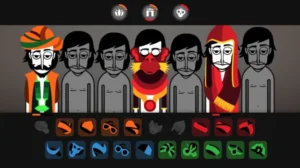
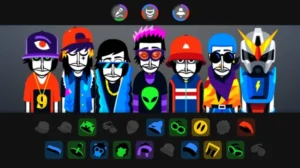
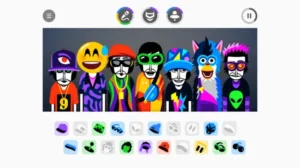
When I first opened Incredibox on my Android device, what immediately impressed me was its user-friendly and intuitive interface, even though I had no prior experience with music. The interface is clean and colorful, with friendly beatboxer characters and easily recognizable icons for beats, melodies, effects, and voices. All I had to do was drag and drop these icons onto the characters, and they instantly started looping sounds that fit together harmoniously. It feels almost like building a mini song puzzle rather than dealing with complicated music tools.
On Android, the touch controls feel smooth and responsive, so it’s easy to layer different sounds and experiment rapidly with combinations. The Android version also includes the latest themes and styles, allowing me to explore a wide range of musical moods, from hip-hop tunes to pop and electronic music, creating a diverse creative playground.
What makes the experience particularly satisfying is the instant audio feedback: as soon as you assign a sound to a character, you hear it loop seamlessly with the rest. That encourages me to try more adventurous mixes without frustration. At the same time, Android users sometimes notice small timing gaps between loops on some devices, which can slightly break immersion if you’re aiming for very tight beats.
Tips for Playing Incredibox APK
To get more out of Incredibox and make your mixes stand out, here are practical tips based on community experience and how the game works:
- Balance Beats and Melody: Start your mix with a strong rhythmic foundation by placing a beat sound first, then layer in melodies and effects. Too many beats can make your composition feel cluttered, so aim for one or two key beats before adding other sound types. Players often suggest keeping at least one bass-style beat to anchor the mix.
- Use Effects Sparingly for Texture: Effects add character, but using too many at once can overwhelm the rhythm. Try adding one effect at a time, listening to how it interacts with the beat and melody, and remove the ones that clash. This helps keep your mix clean and musical.
- Swap and Experiment: Don’t be afraid to swap sounds on characters instead of just adding new ones. Swapping lets you test different combinations quickly and keeps the mix dynamic. For instance, if a melody doesn’t fit the rhythm well, try replacing it with another from the same category.
- Look for Hidden Bonuses: Many versions of Incredibox have secret bonus sequences you can unlock by finding specific sound combos. For example, combining a certain set of beats, effects, and melodies in older versions like “Satisfied” or “Little Miss” triggers a bonus animation. Keeping an eye out for these combos adds an extra goal to your mix session.
- Mute and Solo to Refine: Using the mute and individual playback features for each element during mixing will help you hear the contribution of each element and adjust accordingly. Mute a track can help you detect if it conflicts with others, while playing a vocal or melody individually helps you check its strength within the mix.
- Save and Learn from Great Mixes: Explore the Incredibox Top 50 playlist to see which combinations others enjoy, which might spark new inspiration and help you understand which rhythmic patterns and sound layers work well together.
Pros & Cons of Incredibox APK
Pros
- Easy and Accessible Interface: Incredibox’s drag-and-drop system makes music creation intuitive even for beginners — you can start layering beats and melodies without any prior musical training. Its clean design and animated characters help visualize what you’re doing, which keeps creativity flowing.
- Encourages Creative Play: The game encourages users to experiment with different sound combinations. This fosters creative exploration, and many users enjoy trying new mixes and discovering unexpected rhythms.
- Great for Learning and Relaxation: Because of its simple mechanics, Incredibox is often used to introduce musical concepts like layering and rhythm. The experience is also laid-back and relaxing, making it suitable for casual play or education.
- Share and Record: You can record your composition and share it with others, which adds a social and collaborative dimension — a bonus for users who like feedback and discovery.
Cons
- Limited Depth for Advanced Users: While fun and creative, the gameplay lacks complex progression, challenges, or deep editing tools. Players seeking advanced music production features might find it limiting.
- Repetitive Sound Options: Some users note that sound styles within each version can feel repetitive after extended play, especially if you stick to one musical theme for a long time.
- Minimal Gameplay Mechanics: Unlike traditional games with levels or challenges, Incredibox focuses on freeform creation. This absence of structured objectives can make the experience feel less engaging for those who prefer defined goals.
Conclusion
Incredibox stands out in the mobile app market not just as a game, but as a creative space where users can express themselves through rhythm and melody. Whether you’re exploring your first rhythms or creating layered music, this app offers a fun and intuitive way to interact with music. Its cross-platform compatibility, user-friendly design, and community features make it a standout choice for Android users who want to mix, share, and shine. Download Incredibox on Android today and start creating music your way!
FAQs
1. Does Incredibox work offline?
Yes. Once installed, all core music-creation features work offline, including recording and mixing.
2. Can I export my mixes as audio files?
Yes, the paid mobile version allows exporting your finished mix as an MP3 file.
3. Are Incredimods available on Android?
Yes. Recent updates added official Incredimods support, letting users browse and install curated community versions directly in the app.
4. How many music versions are included in Incredibox?
The app includes multiple themed versions, each offering its own set of beats, effects, and melodies. New styles are added over time through updates.
5. Does Incredibox have a built-in tutorial?
Not a traditional tutorial, but the interface is designed to be self-explanatory, with sound icons and animations guiding new users.
What's new
- Incredimods support: Browse & play curated community creations inside the app.
- Retro-themed V9 Wekiddy: New 90s-inspired style and colorful beats.
- UI enhancements & bug fixes: Smoother navigation, improved stability.
Images