BinWiz VPN
BinWiz Team
Oct 31, 2023
Dec 17, 2025
27 MB
1.2.2
Android 7.0+
5937

Description
BinWiz VPN is a lightweight Android app designed for secure web browsing, fast connections, and easy access to restricted content. Discover the full app and why it’s becoming increasingly popular with users below.
What is BinWiz VPN APK
BinWiz VPN is a virtual private network (VPN) tools focused on the Android operating system, helping users browse the internet more privately and securely by hiding their real IP address and encrypting their connection. It uses modern VPN protocols and multiple server locations to let you access restricted content and maintain a stable, censorship-resistant connection without complex setup steps. Designed for simplicity, the app offers one-tap activation and works across mobile data and Wi-Fi, making it useful for anyone who wants basic privacy protection and access to content from other regions.
What features does BinWiz VPN APK offer?
- Boost Internet Connection
BinWiz VPN attempts to improve your general browsing experience by optimizing routing through its servers. This can help reduce lag and improve responsiveness during everyday tasks like loading web pages or using apps. - Censorship Resistance
The app is designed to bypass regional blocks and filtering that may restrict access to certain websites or services. This means you can reach content that might otherwise be unavailable in your area. - Advanced and Up-to-Date Protocols
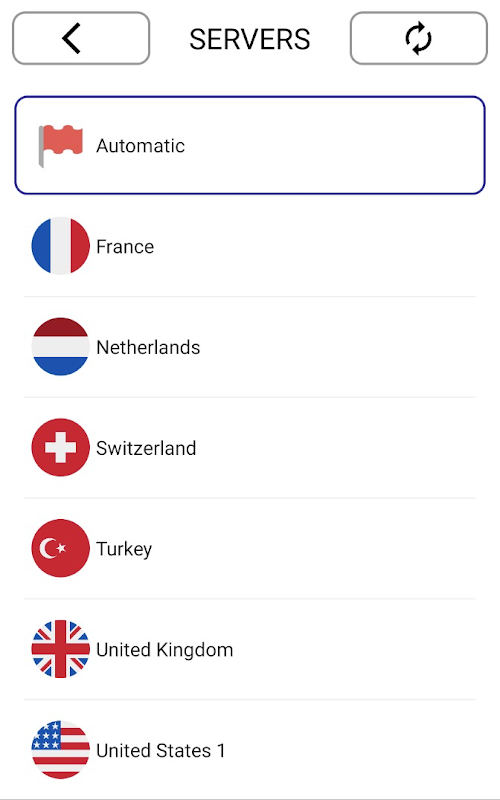
It uses modern VPN technologies to create a secure and stable tunnel for your traffic. This helps protect your connection and makes the VPN more reliable on different networks. - Multi-Region Server Support
BinWiz VPN allows connections through servers in multiple regions, giving you flexibility to choose where your traffic appears to originate. This enables access to region-specific content and can help improve performance based on server availability.
Pros and Cons of BinWiz VPN APK
Pros
- User-Friendly and Simple to Use: Many users appreciate BinWiz VPN’s one-tap connect and clean interface, making it easy for beginners to secure their connection without technical setup.
- Fast and Reliable Connection: Reviews often mention quick connection times and generally stable performance, which makes it suitable for daily browsing and lightweight use.
- Free and Lightweight: The app is free to use and doesn’t take up much space on devices, making it convenient for most Android phones.
- Good for Accessing Restricted Content: Users report that it effectively helps bypass regional blocks and censorship, widening access to geo-restricted sites.
Cons
- Occasional Server Issues: Some users note that certain server connections can fail or stop working temporarily, requiring reconnection or troubleshooting.
- Limited Advanced Controls: Unlike premium VPN services, BinWiz VPN doesn’t offer deep customization or settings for advanced users.
- Data Collection Practices: The app may share some data like location and app performance with third parties for analytics or ads, which some privacy-focused users may not prefer.
- Dependence on Server Load: Performance can vary based on server availability and regional load, which may affect speed or reliability at peak times.
What is the experience like using BinWiz VPN APK on an Android mobile device?
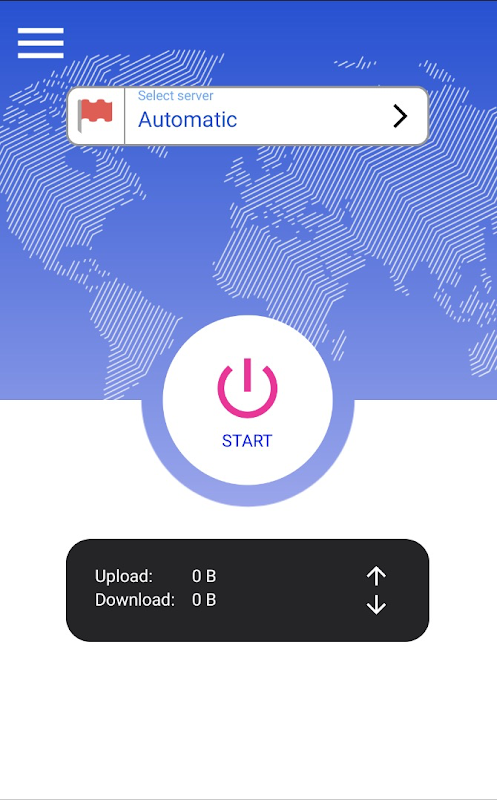
- Control Experiences: I connected to a VPN server with just a single tap, and that simplicity made it quick to secure my connection whenever I needed it. Switching between servers is automatic, so I didn’t have to dig through complicated settings to stay protected.
- Game Experience on Android Devices: When I opened games while connected to the VPN, most titles ran smoothly with no major lag, especially casual and online games that don’t demand extreme speed. On some game servers that are region-locked, I noticed I could access content that’s usually limited in my area.
- User Interface Experience: The app’s interface is clean and easy to navigate, with a large connect button and clear status indicators that tell me whether I’m protected. I didn’t feel overwhelmed by technical terms or extra menus, which made the whole experience feel accessible even if I wasn’t familiar with VPN tools.
Tips for Using BinWiz VPN APK on Your Android Device
- Choose the Closest Server First
When you open the app, try connecting to a server that’s geographically nearest to you if there’s an option. This often gives you better speeds for streaming or browsing compared to distant servers. - Reconnect if Speeds Drop
If you notice slower browsing or buffering while connected, simply disconnect and tap connect again. This can prompt the app to choose a better route and improve performance. - Use VPN Before Launching Sensitive Apps
Before opening apps where you want privacy (like banking or messaging), launch BinWiz VPN and connect first. This helps ensure all data from that app is encrypted right from the start. - Test Different Servers for Content Access
If a specific site or app is blocked in your area, try switching between a few available regions. For example, content available in one country might not be in another, so experimenting can help you find the best one. - Monitor Battery and Data Use
Using a VPN can slightly increase data usage because of encryption overhead. If you’re on a limited plan, keep an eye on data consumption in your Android settings and disconnect the VPN when not needed.
Conclusion
BinWiz VPN is a practical, user-friendly VPN solution built for everyday Android users who value privacy, freedom, and simplicity. Its lightweight design, stable connections, and intuitive interface make it a strong choice for browsing securely and bypassing network restrictions without complexity. If you’re looking for a straightforward VPN app that works right out of the box, BinWiz VPN is worth downloading and trying today. Download BinWiz VPN now and take control of your Android internet experience.
FAQs
1. Can BinWiz VPN APK hide my real IP address?
Yes, the app masks your original IP by routing traffic through its VPN servers.
2. Does BinWiz VPN APK support multiple server locations?
Yes, it offers access to servers in different regions to help with speed and content access.
3. Is the connection encrypted?
Yes, BinWiz VPN encrypts data in transit to protect your connection on Wi-Fi and mobile networks.
4. Does BinWiz VPN APK work on public Wi-Fi?
Yes, it is designed to secure your connection on public Wi-Fi networks like cafés or airports.
5. Is BinWiz VPN APK easy for beginners to use?
Yes, the one-tap connect interface makes it simple even for users with no VPN experience.
What's new
- Improved server connection stability
- Faster auto-connect algorithm
- Reduced app startup time
- Minor UI refinements
- General bug fixes and performance improvements
Images