Bean.NG Drive Cliff Road
Indie Simulation Studio
January 12, 2026
192 MB
1.6
Android 8.0+
8102
Description
Introduction
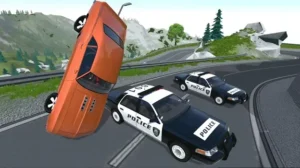
Bean.NG Drive Cliff Road is a driving simulation game developed by Indie Simulation Studio, released in 2024 for Android devices, focusing on realistic vehicle physics and high-risk mountain driving. The game stands out with its cliff-side road environments, physics-based car handling, and damage system that directly affects how vehicles perform, creating a more authentic driving experience than typical arcade racers. Designed for players who enjoy precision, control, and realism, it offers a slower but more intense approach to mobile driving games. Discover an overview of this game and the importance of careful driving as you learn more in the article below.
All Features of the game Bean.NG Drive Cliff Road APK
- Realistic Vehicle Physics: The standout feature of Bean.NG Drive Cliff Road is its physics-driven gameplay. Vehicles respond to gravity, terrain slope, braking force, and steering input in a way that feels grounded. Every turn on a cliff road matters, and small mistakes can result in dramatic crashes. Unlike traditional racing games, the car is not just a visual model, it behaves like a physical object affected by weight distribution and momentum.
- Dynamic Damage System: Crashes are not cosmetic. When you hit a barrier or slide into a rock wall, the damage directly affects how the car performs. Bent wheels, reduced steering response, and unstable suspension add a layer of strategy. Sometimes, continuing to drive a damaged vehicle becomes a challenge in itself.
- Cliff Road Environments: The game revolves around narrow mountain paths, steep drop-offs, sharp curves, and uneven surfaces. These environments are intentionally unforgiving. There are no wide safety margins, making every drive tense and immersive. Recent updates have expanded terrain variety with longer cliff routes and more elevation changes.
- Skill-Based Driving: There is no rush to the finish line. Players must control acceleration, braking, and steering carefully. Over-speeding on a descent or braking too late on a curve almost guarantees failure. This makes the experience feel more like a driving test than a race.
- Immersive Audio & Visuals: Engine sounds, tire friction, and collision effects are synchronized with vehicle physics. Visually, the game prioritizes functional realism over flashy effects, ensuring stable performance across mid-range devices.
- Mobile Optimization: Despite its physics-heavy design, the game runs smoothly on most modern Android phones. Touch controls are responsive, and optional sensitivity settings allow players to fine-tune handling to their preference.
Best Vehicle Control Settings for Bean.NG Drive Cliff Road APK
Because Bean.NG Drive Cliff Road doesn’t publish an official “pro settings” sheet publicly, the most accurate approach is to tune what the game actually exposes in its Controls menu, especially steering sensitivity, dead zone, and response curve/linearity (these are standard adjustment points in physics-heavy driving sims). BeamNG’s own documentation also points players to the in-game Options → Controls area for control tuning, which is the same workflow you’ll want to follow here.
Use these settings as a clean starting point, then fine-tune in 2–3 short test runs on the cliff roads:
- Steering method: Choose Tilt if you want smoother micro-corrections on narrow roads. Choose On-screen wheel/buttons if you prefer stable inputs and less accidental drift on bumpy terrain.
- Steering sensitivity: set to 40–60%
This range usually keeps the center steering less twitchy while still letting you recover quickly on sudden turns. - Steering linearity / response curve (if available): set to Medium-High
Higher linearity makes small movements near the center more controllable, useful when your car is close to the edge. Communities for realistic driving sims commonly recommend raising linearity to reduce overreaction around center steering. - Dead zone (if available): keep it as low as possible without drift
The goal is to remove stick/tilt “noise” without making the car wander straight-line. This is the same principle recommended in sim driving discussions: increase only until unwanted input disappears. - Braking control: enable separate Brake/Reverse (if the toggle exists)
This reduces accidental reverse triggers on steep slopes and helps with controlled descents. - Camera: use a slightly higher FOV or a farther chase camera (if adjustable)
You’ll see cliff edges earlier, which improves reaction time on blind turns.
Pros and Cons of Bean.NG Drive Cliff Road APK
Pros
- Realistic Vehicle Physics & Damage: The game’s physics system simulates how vehicles behave under stress, including dynamic deformation and realistic handling on uneven terrain. This depth enhances immersion and makes driving feel mechanically authentic.
- Challenging Cliff Road Environments: Narrow mountain and cliffside roads create tense situations that reward careful, precise driving rather than just speed. This makes every journey feel meaningful and skill-based.
- Variety of Driving Scenarios: Beyond simple navigation, players encounter different terrains and driving conditions, encouraging experimentation and skill refinement over time.
- Device Optimization: The Android version has been refined to run smoothly across mid-range hardware, balancing performance with detailed simulation.
- Immersive Exploration Feel: Open, varied environments and responsive vehicle behavior add a sense of freedom and realism not commonly found in casual driving games.
Cons
- Steep Learning Curve: Because driving is simulation-focused and not arcade-style, new players may struggle with control responsiveness and mastering vehicle dynamics at first.
- Complex Controls for Beginners: Some users report that adapting to the steering and braking systems takes time, especially on mobile touchscreen devices without physical controllers.
- Performance Variability on Older Devices: High physics fidelity can tax less powerful Android devices, leading to occasional slowdown or reduced graphics quality.
- Limited Multiplayer or Competitive Features: The focus on solo simulation means there are fewer options for racing against others or competing in structured events compared to some other driving titles.
- Interface Complexity: Menus and advanced vehicle options might feel overwhelming to players who prefer quick pickup-and-play experiences.
Tips for Playing Bean.NG Drive Cliff Road
Here are practical tips to help you drive better and survive longer on dangerous cliff roads, without repeating what’s already covered in the article.
- Drive slower than you think you need: The game rewards patience. Reducing speed before sharp turns gives you more control and lowers the risk of sliding off narrow roads.
- Brake before turning, not during: Apply brakes early, straighten the car, then steer through the corner. Braking while turning often causes loss of traction, especially on slopes.
- Adjust driving on downhill sections: On steep descents, avoid full acceleration. Use light braking and steady steering to prevent momentum from pulling the car out of control.
- Watch how the car reacts after small impacts: Minor collisions can affect steering and balance. Pay attention to changes in handling so you can compensate instead of pushing the car too hard.
- Be cautious when road surfaces change: When moving from asphalt to dirt or gravel, ease off the throttle. Reduced grip can cause sudden sliding if speed stays the same.
Conclusion
If you’re tired of arcade racing games and want to experience a real driving simulation on Android, Bean.NG Drive Cliff Road is the right choice. The game rewards and praises careful drivers, punishes reckless behavior, and offers a level of realism rarely seen in mobile games.
Whether you enjoy challenging your physics limits or simply controlling your vehicle precisely on treacherous roads, this game is worth your time. Download Bean.NG Drive Cliff Road now and experience the thrill of realistic ramp driving on Android.
FAQs
1. Is Bean.NG Drive Cliff Road available offline?
Yes, the game can be played offline without an internet connection.
2. Does the game support multiple vehicles?
Yes, players can drive different vehicles with unique handling characteristics.
3. How realistic is the driving physics?
The game uses physics-based mechanics where terrain, gravity, and damage affect vehicle behavior.
4. Are crashes purely visual?
No, damage impacts performance such as steering control and stability.
5. Does the game include different maps?
Yes, it features multiple cliff-road environments with varying difficulty levels.
What's new
- Improved vehicle suspension physics
- Smoother steering response on slopes
- New extended cliff-road routes
Images